Item Classes
| Summary Information | |
|---|---|
| Menu Path: | Inventory — Item Classes |
| Required Feature(s): | Inventory |
Navigation:
Inventory → Item Classes
The Item Classes module allows administrators to define and manage categories or classifications for inventory items. Item classes help organize products, apply specific tax rules, and designate items for special purposes such as surcharges. Each configuration specifies a unique Code, a Description, and settings for taxability and surcharge classification.
By configuring item classes, organizations can ensure that inventory items are properly categorized and that the correct tax and surcharge rules are applied when items are processed through the POS system.
Purpose of Item Classes
Item classes are used to:
- Categorize and organize inventory items for reporting and management.
- Define whether items in the class are always taxable, overriding customer tax exemptions.
- Designate specific classes as surcharge classes, allowing them to be used in automatic item surcharge configurations.
- Standardize item classification across the organization.
Creating or Editing an Item Class
To configure a new item class or modify an existing one:
- Navigate to
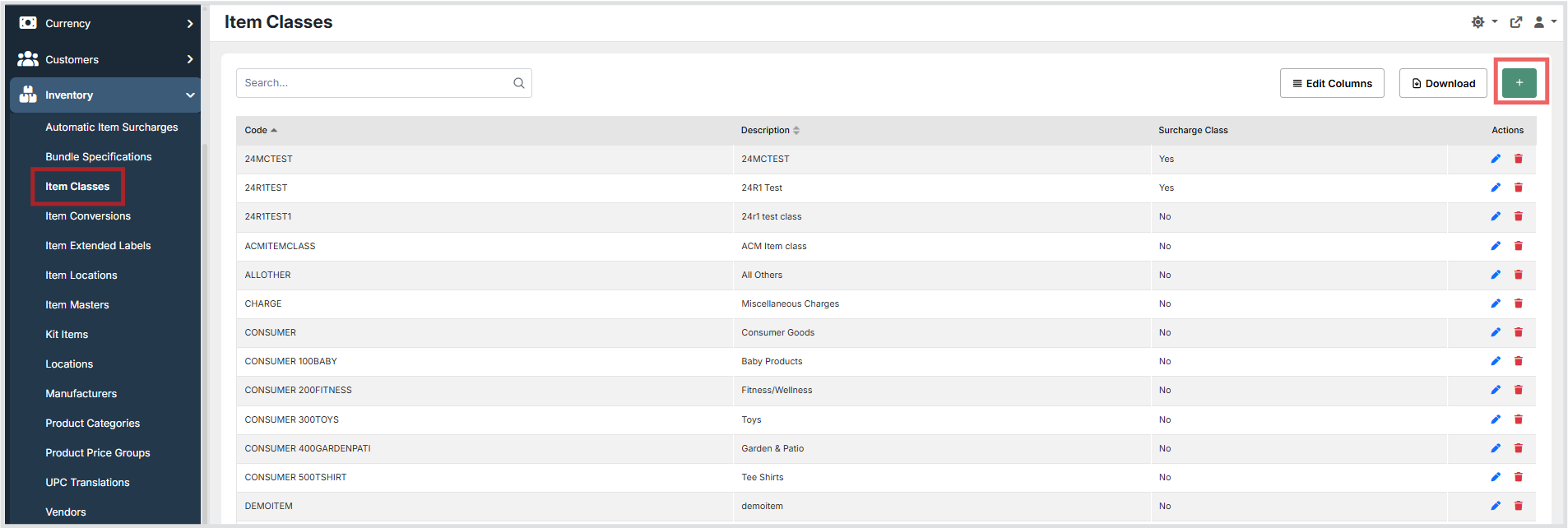
Inventory → Item Classes. - Click the + button to create a new item class, or use the grid Actions to edit an existing entry.
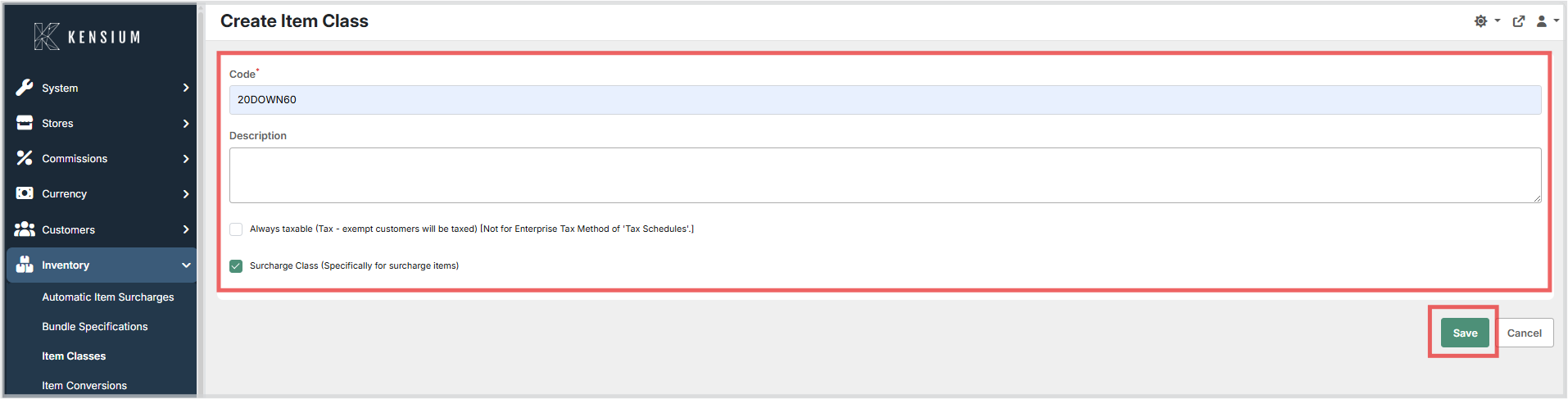
- Enter a unique Code to identify the item class.
- Optionally enter a Description to explain the purpose or category of this item class.
- Configure the tax and surcharge settings using the available checkboxes.
- Click Save to apply the configuration, or Cancel to discard the changes.
Available Fields
| Field | Description | Field Behavior |
|---|---|---|
| Code | A unique code identifying the item class. | Required. Must be unique across all item classes. Maximum 30 characters. |
| Description | A brief explanation of the purpose or category of this item class. | Optional. Maximum 40 characters. |
| Always Taxable | Indicates whether items in this class are always taxable, even for tax-exempt customers. | Checkbox. When enabled, tax-exempt customers will still be taxed for items in this class. Note: This setting does not apply when using the Tax Schedules tax method. |
| Surcharge Class | Indicates whether this item class is used for surcharge items. | Checkbox. When enabled, this class can be selected when configuring Automatic Item Surcharges. |
Operational Considerations
- The Code must be unique across all item classes. Attempting to save a duplicate code will result in a validation error.
- Use the Always Taxable setting carefully, as it overrides customer tax exemptions. Verify compatibility with your configured tax method before enabling it.
- The Surcharge Class setting must be enabled for an item class to be available for selection in the Automatic Item Surcharges module.
- Modifications to item classes will affect all items assigned to that class review item assignments before making significant changes.