Payment Types
| Summary Information | |
|---|---|
| Menu Path: | Payments — Payment Types |
| Required Feature(s): | Currency |
Navigation:
Payments → Payment Types
The Payment Types module allows administrators to configure the tender types used at checkout (for example, cash, card, gift card). Each payment type defines how the POS should behave when that tender is selected, including over-tender/change handling, manager authorization requirements, receipt printing, and prompts.
Payment types are also referenced by other modules (for example, Gift Card Definitions) to determine which tender should be recorded when gift cards are redeemed.
Purpose of Payment Types
Payment types are used to:
- Define which tenders are available at checkout
- Control over-tender and change handling
- Require manager authorization when needed
- Control receipt printing behavior
- Capture additional information using prompts
- Control whether the tender is included in cash room counting/closing totals
Creating or Editing a Payment Type
To create or modify a payment type:
- Navigate to
Payments → Payment Types. - Click the + button to create a new payment type, or choose an existing payment type to edit.
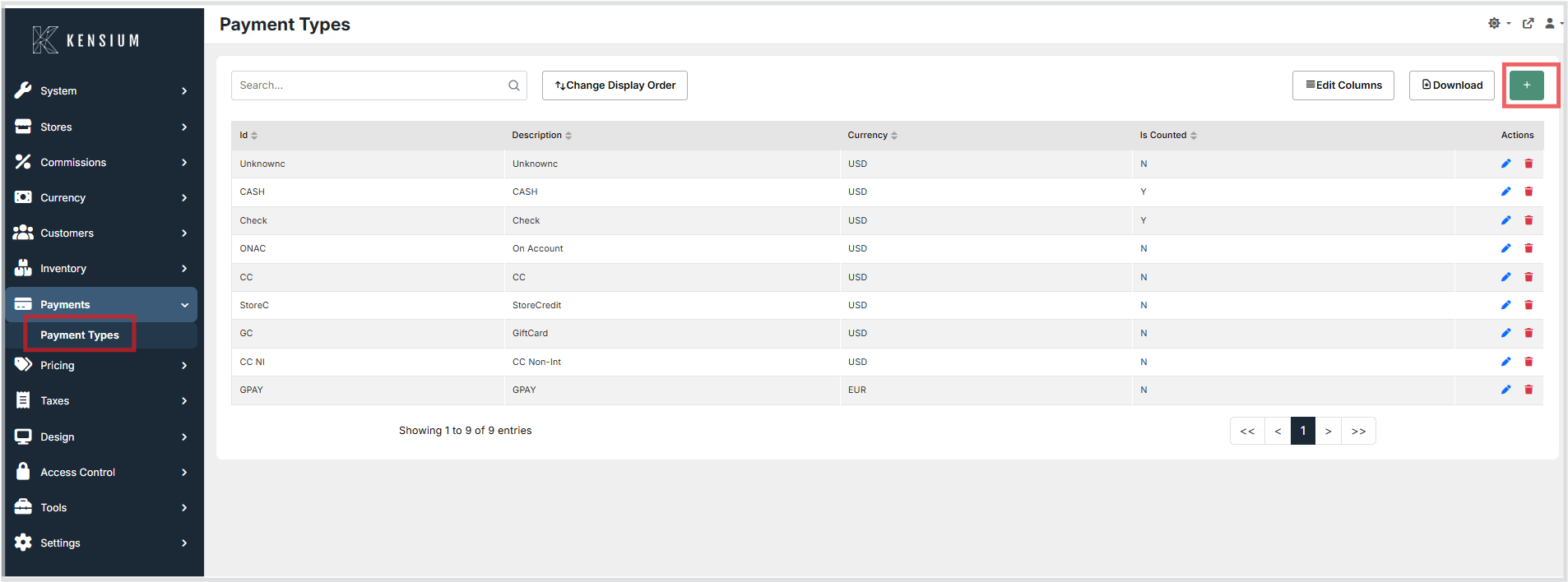
- Enter the configuration details (by section).
- Click Save to apply the changes, or Cancel to discard them.
Configuration Sections
Payment Types are organized into the following configuration sections.
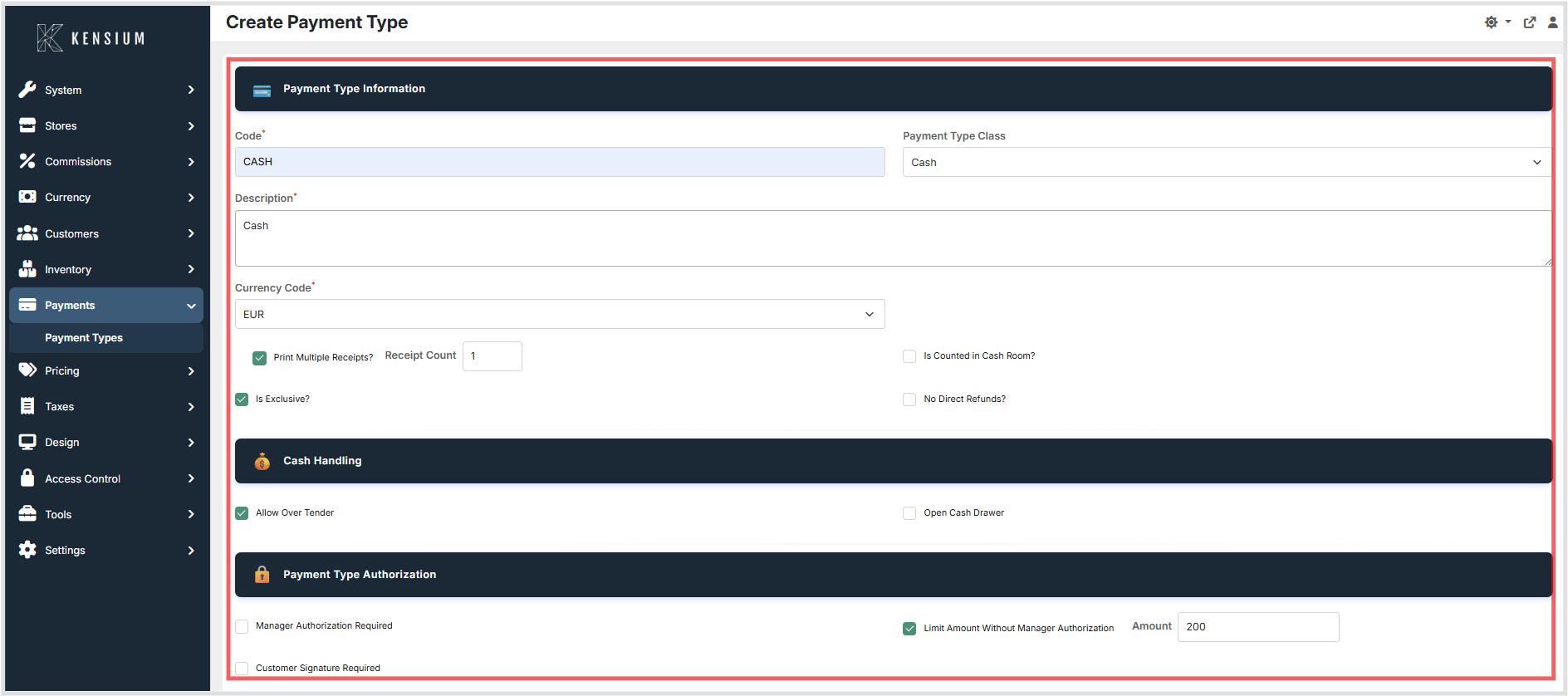
1. Payment Type Information
| Field | Description | Field Behavior |
|---|---|---|
| Code | Code for the payment type. | Required. Must be unique. The POS uses this code to identify the tender. |
| Description | Descriptive name for the payment type. | Required. Shown in the admin screen and POS. |
| Currency Code | Currency code used for this tender. | Required. Must match a code configured under Currency Types (for example, USD). |
| Payment Type Class | Category that controls POS handling for the tender. | Required. Select the class that matches how the tender should behave. |
| Print Multiple Receipts | Print multiple copies of the receipt. | When enabled, the number of receipt copies is printed as configured in Receipt Count. |
| Is Counted in Cash Room | Include this tender in close/count procedures. | When enabled, this tender is included in counting and closing totals. |
| Is Exclusive | Requires this to be the only tender used on the sale. | When enabled, the POS should not allow split tender with other payment types. |
| No Direct Refunds | Blocks direct refunds back to this tender. | When enabled, the POS will not allow refunding directly to this payment type. |
| Receipt Count | Number of receipt copies to print. | Required. Default is 1. Set higher than 1 when Print Multiple Receipts is enabled. |
2. Cash Handling
| Field | Description | Field Behavior |
|---|---|---|
| Allow Over Tender | Allow taking more than the amount due. | When enabled, the POS can accept extra payment and return change/cash‑back. |
| Open Cash Drawer | Opens the cash drawer when this tender is used. | When enabled, the drawer opens when this tender is used. |
3. Payment Type Authorization
| Field | Description | Field Behavior |
|---|---|---|
| Manager Authorization Required | Require manager approval for this tender. | When enabled, manager approval is required every time this tender is used. |
| Limit Amount Without Manager Authorization | Require manager approval only above a threshold. | When enabled, manager approval is required only when the tender amount exceeds the specified amount threshold. |
| Amount | Amount threshold that triggers manager authorization. | Used only when Limit Amount Without Manager Authorization is enabled. Specify the maximum amount that can be processed without manager approval. |
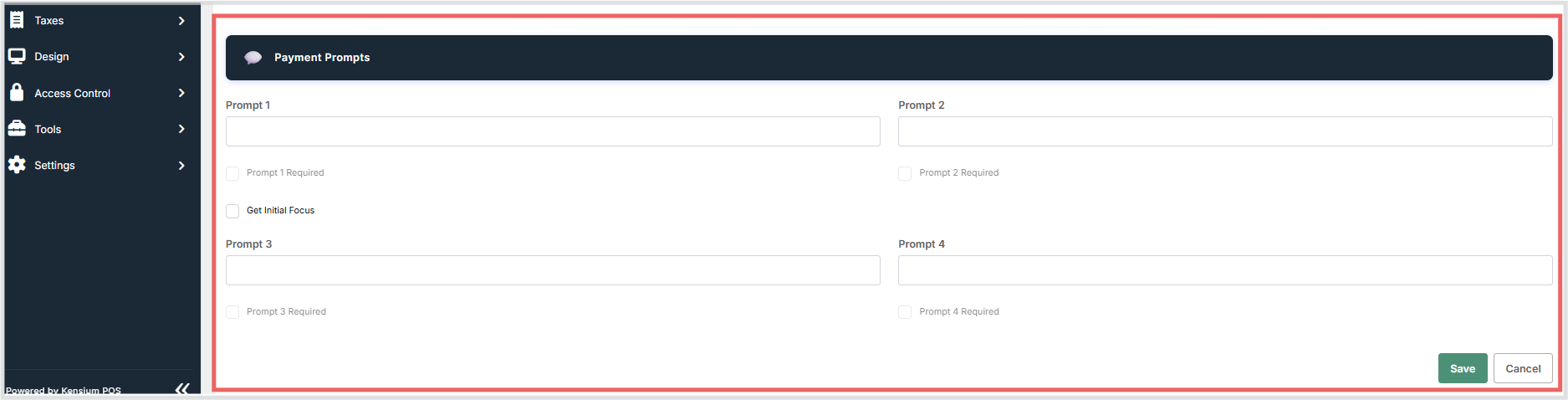
4. Payment Prompts
| Field | Description | Field Behavior |
|---|---|---|
| Prompt 1–4 | Messages shown when the tender is selected. | Optional. Leave blank to hide the prompt. Up to four prompts can be configured. |
| Prompt 1–4 Required | Require an answer for a prompt. | When enabled, a value is required for the corresponding prompt (only when that prompt is set). |
| Get Initial Focus | Automatically moves the cursor to Prompt 1 input. | When enabled, the POS sets focus to the Prompt 1 input field (when Prompt 1 is set). |
Legacy fields
The legacy database table includes older fields kept for backward compatibility (for example, older credit-card verification and check endorsement fields). These are not part of the current model interface and are not intended for current configuration.
Operational Considerations
- Use clear, consistent Codes for identification.
- Ensure Currency matches a configured currency under Currency Types.
- Enable Overtender only when change/cash‑back should be allowed for the tender.
- Use Change Type Key only when change must be given using a different tender.
- Use Require Authorization when approval is required for all amounts.
- Use Require Authorization Over Amount when approval is required only above a threshold amount.
- Use Prompts only when additional information is required during tender.
- Keep Is Counted aligned with store counting and closing procedures.