Vendors
| Summary Information | |
|---|---|
| Menu Path: | Inventory — Vendors |
| Required Feature(s): | Inventory |
Navigation:
Inventory → Vendors
The Vendors module allows administrators to define and manage supplier records used across purchasing and receiving workflows. Vendor records are referenced by item locations, purchase orders, and receiving transactions to identify where stock is purchased from and how it should be routed.
Purpose of Vendors
Vendors are used to:
- Store supplier contact and ordering information for use in purchasing and receiving.
- Associate preferred vendors with specific inventory items at specific locations.
- Provide default payment terms and shipping methods for purchase orders.
- Maintain accurate supplier contact details to support ordering and communications.
Creating or Editing a Vendor
To create a new vendor or modify an existing one:
- Navigate to
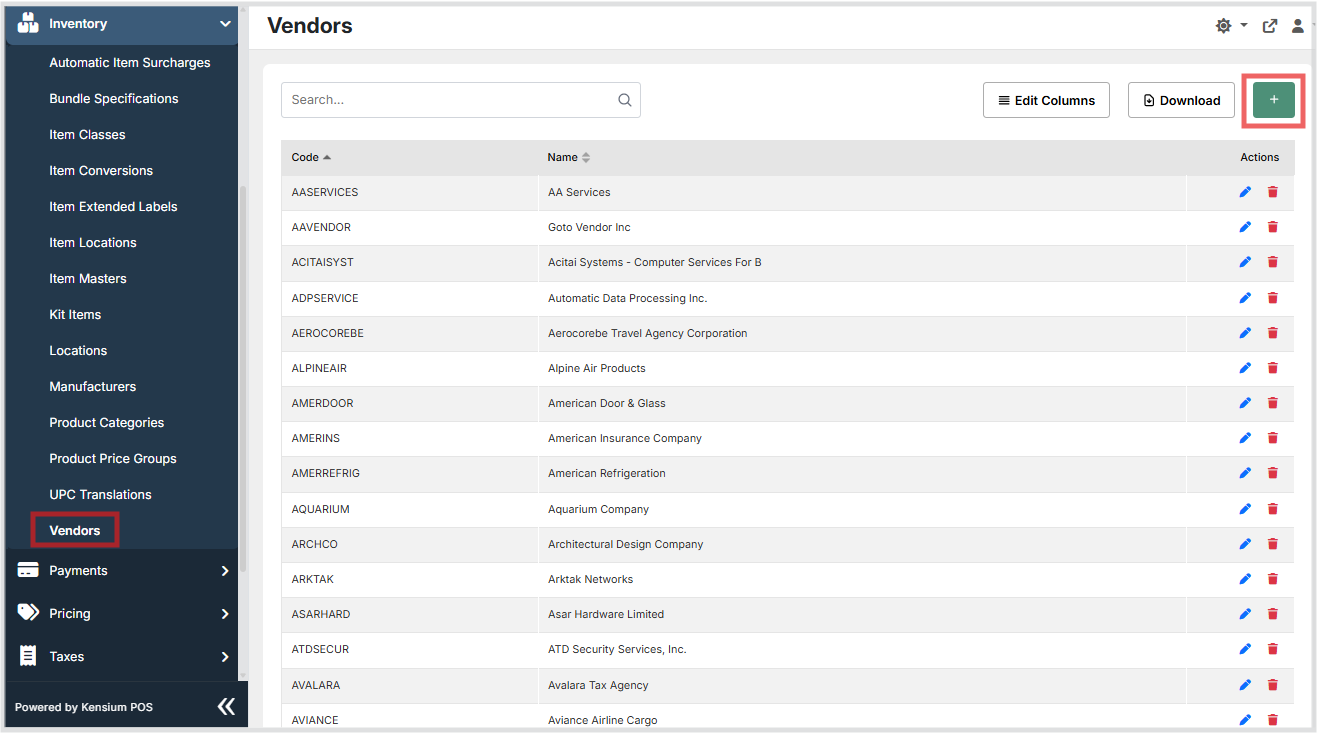
Inventory → Vendors. - Click the + button to create a new vendor, or click the edit action on an existing row.
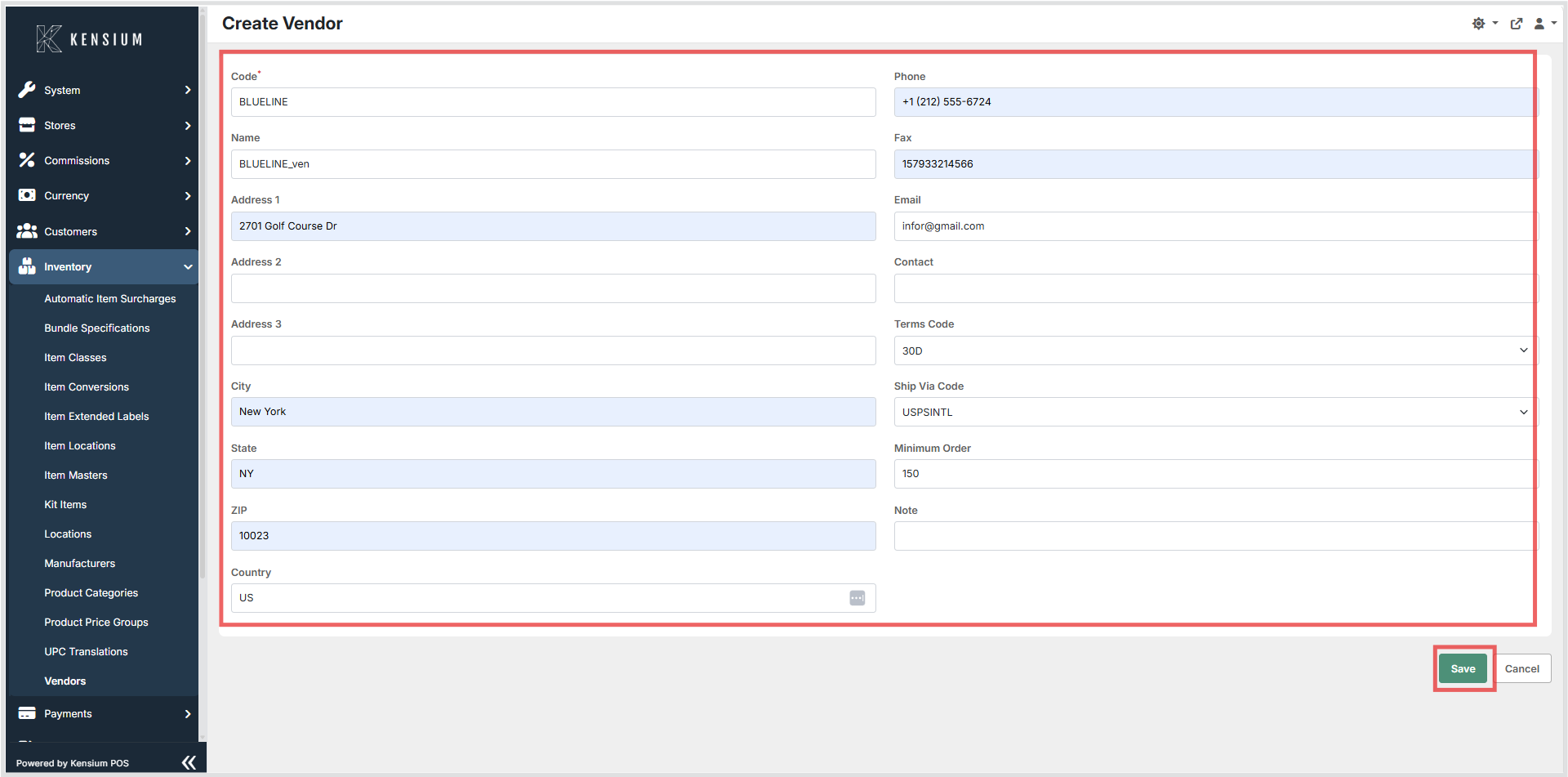
- Fill in the fields on the form. Required fields are noted below.
- Use the Terms and Ship Via pickers to select the appropriate payment terms and shipping method.
- Click Save to persist the vendor, or Cancel to discard changes.
Available Fields
| Field | Description | Field Behavior |
|---|---|---|
| Code | A unique code used to identify the vendor throughout the system. | Required. Must be unique across all vendors. Used as the primary reference in pickers and integrations. |
| Name | The display name of the vendor. | Optional. Shown in lists and pickers to help identify the vendor. |
| Address 1 / 2 / 3 | The vendor's mailing address lines. | Optional. Used for purchase orders and communications. |
| City | The city portion of the vendor's address. | Optional. |
| State | The state or region of the vendor's address. | Optional. |
| ZIP | The postal code of the vendor's address. | Optional. |
| Country | The country of the vendor's address. | Optional. |
| Phone | The vendor's primary telephone number. | Optional. |
| Contact | The name of the primary contact person at the vendor. | Optional. |
| Fax | The vendor's fax number. | Optional. |
| The vendor's email address for contact and ordering. | Optional. | |
| Terms Code | The payment terms that apply to orders placed with this vendor. | Optional. Select from the configured terms codes. Common examples include Net 30 or Due Upon Receipt. |
| Ship Via Code | The default shipping method used when ordering from this vendor. | Optional. Select from the configured ship via codes. |
| Minimum Order | The minimum order amount or quantity required by this vendor. | Optional. Free-text field for notes or a numeric value. |
| Note | Any additional notes or instructions related to this vendor. | Optional. Free-text field. |
Operational Considerations
- The Code field should be unique and stable - it is used as the reference key in integrations and import tools. Changing a vendor code after it has been assigned to item locations or purchase orders may cause data inconsistencies.
- Use the Terms and Ship Via pickers to ensure the selected codes match your configured payment and shipping methods.
- Keep address and contact information up to date to ensure accurate purchase orders and receiving communications.
- Deleting a vendor that is actively referenced by item locations or open purchase orders may cause data integrity issues - verify the vendor is no longer in use before removing it.
Notes
- The vendors grid supports searching, column editing, and export / download actions.
- The create/edit form uses pickers for Terms Code and Ship Via Code, and standard text inputs for all other fields.