Product Price Groups
| Summary Information | |
|---|---|
| Menu Path: | Inventory — Product Price Groups |
| Required Feature(s): | Inventory |
Navigation:
Inventory → Product Price Groups
The Product Price Groups module allows administrators to define and manage a list of price groups used to categorize products that share similar pricing structures or discount schemes. Each product price group record consists of a unique ID and an optional description, providing a structured way to apply consistent pricing logic across inventory items.
Product Price Groups are typically managed within the ERP and synchronized into the POS system. Maintaining well-defined price groups supports pricing consistency, discount management, and reporting across stores and channels.
Purpose of Product Price Groups
Product Price Groups are used to:
- Categorize inventory items into logical pricing groups for consistent pricing and discount application.
- Provide a standardized ID and description for each price group across the system.
- Support pricing workflows by enabling price-group-based filtering, searches, and exports.
- Ensure consistency when integrating with ERP or external systems that reference product price group codes.
Creating or Editing a Product Price Group
To create a new product price group or modify an existing one:
- Navigate to
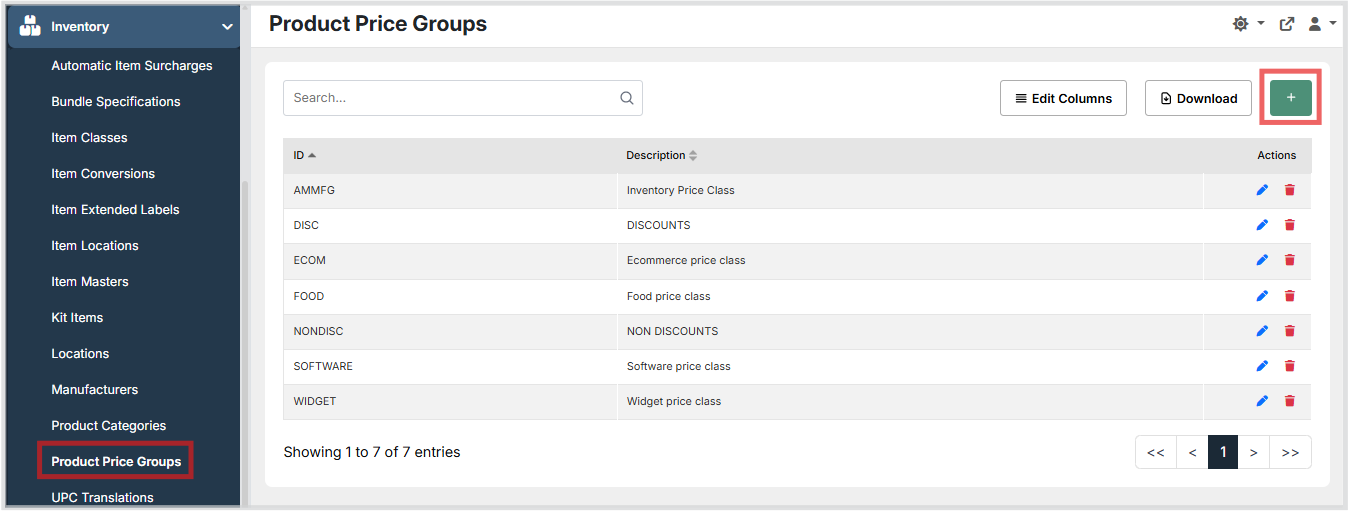
Inventory → Product Price Groups. - Click the + button to create a new product price group, or use the grid Actions to edit an existing entry.
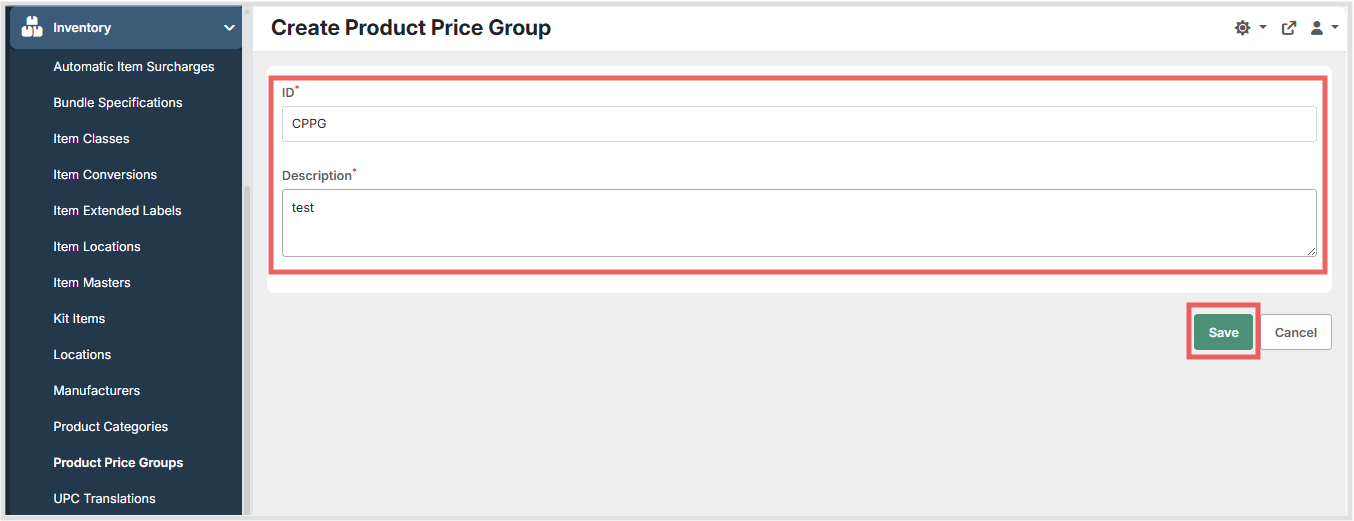
- Enter a unique ID to identify the product price group. This value must be unique across all price groups.
- Optionally enter a Description to provide a human-readable explanation of the price group.
- Click Save to persist the configuration, or Cancel to discard changes.
Available Fields
| Field | Description | Field Behavior |
|---|---|---|
| ID | A unique code identifying the product price group. | Required. Must be unique across all price groups. |
| Description | A descriptive label for the product price group. | Optional. If left empty, no description is stored. |
Operational Considerations
- The ID field must be unique it cannot be shared with another price group.
- The Description field is optional; if left blank, it will appear empty in the grid.
- Product Price Groups are typically sourced from the ERP system. Manual creation or modification in the POS admin should be coordinated with ERP data to avoid conflicts during synchronization.
- Changes to a product price group's ID or Description will be reflected wherever the price group is referenced in inventory items and pricing rules.
- Deleting a product price group that is actively assigned to inventory items may cause those items to lose their pricing group assignment verify that no items reference the price group before removing it.
- Records that are removed in the ERP are marked as deleted in the POS and will no longer appear in active selections, but are retained for historical reference.
Notes
- The product price groups grid supports searching, column editing, and export/download actions.
- The grid displays ID and Description columns with sortable headers.
- The create/edit form uses a standard text input for ID and a multi-line text area for Description.
- Only ID is required the form can be saved with an empty Description.