Printing Configuration
Configure which printer prints each document type and how many copies.
Assign which printer prints each document type (Receipts, Quotes, Invoices, Pick Tickets) and specify how many copies of each should print. Configure settings for all document types in one location.
Configure Printing
- Press F7 (Configure) from Home Page
- Go to PRINTING tab
- For each document type, set:
- Printer - Which printer slot to use
- # Copies - How many copies to print
- Click Save to apply
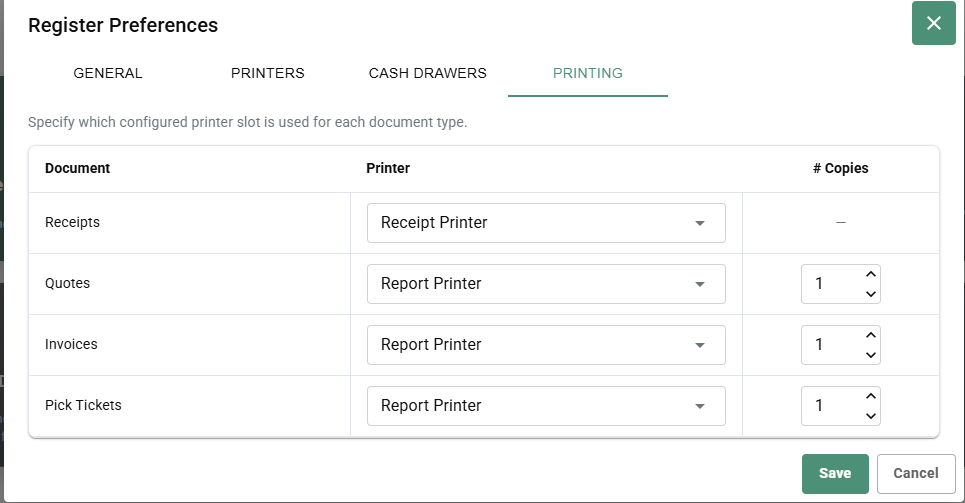
Document Types
Receipts - Customer purchase receipts
- Printer: Receipt Printer (required)
- Copies: Usually 1-2
Quotes - Saved but incomplete sales
- Printer: Report Printer
- Copies: 1
Invoices - Shipped or on-account orders
- Printer: Report Printer
- Copies: 1
Pick Tickets - Order picking/packing slips
- Printer: Report Printer
- Copies: 1
Printer Selection
For each document type:
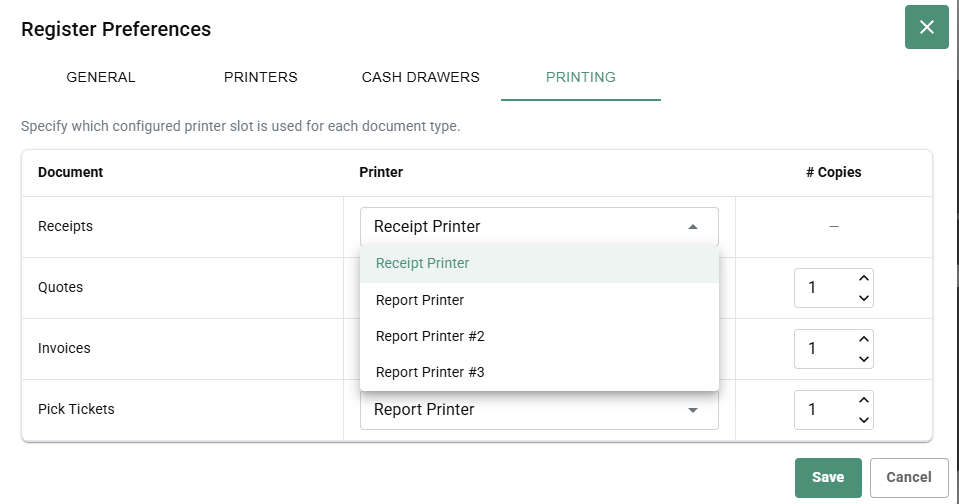
- Click printer dropdown
- Select desired printer slot:
- Receipt Printer
- Report Printer
- Report Printer #2
- Report Printer #3
- Set number of copies (1-9)
Number of Copies
Set how many copies to print for each document:
- Receipts - Usually 1-2 (customer + file)
- Quotes - Usually 1
- Invoices - Usually 1-2
- Pick Tickets - Usually 1
Adjust based on your store's needs.