UPC Translations
| Summary Information | |
|---|---|
| Menu Path: | Inventory — UPC Translations |
| Required Feature(s): | Inventory |
Navigation:
Inventory → UPC Translations
The UPC Translations module allows administrators to define and manage mappings between UPC (Universal Product Code) barcodes and inventory items. Each UPC translation record links a scanned barcode to a specific item and unit of measure, enabling the POS system to correctly identify and price items at the point of sale.
A single inventory item may have multiple UPC translations - one for each unit of measure (e.g., EA, BOX10, PALLET) - allowing the same item to be sold or received in different packaging configurations using distinct barcodes.
Purpose of UPC Translations
UPC Translations are used to:
- Map scanned UPC barcodes to the correct inventory item and unit of measure at the point of sale.
- Support multiple packaging configurations for a single item by associating different UPC codes with different units of measure.
- Provide an optional item description to supplement the barcode lookup with human-readable context.
- Ensure accurate item identification during sales, receiving, and inventory operations.
Creating or Editing a UPC Translation
To create a new UPC translation or modify an existing one:
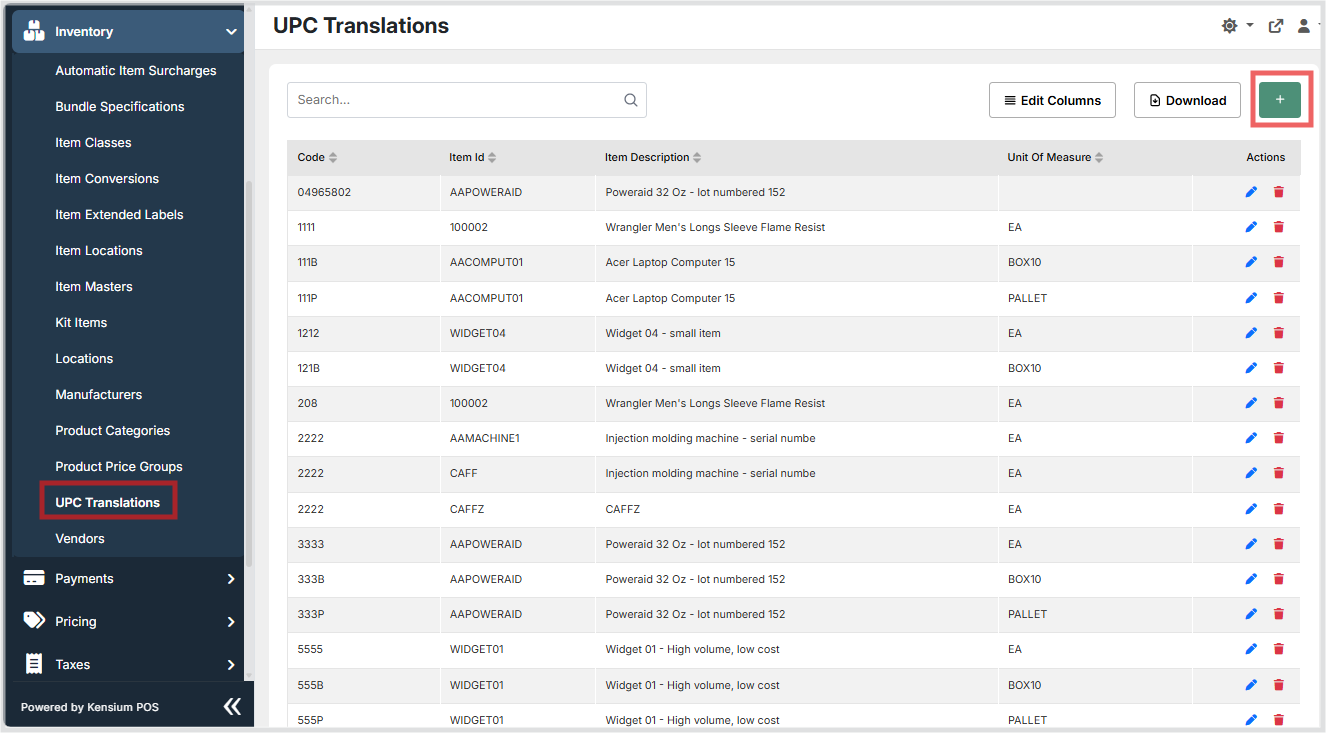
- Navigate to
Inventory → UPC Translations. - Click the + button to create a new UPC translation, or use the grid Actions to edit an existing entry.
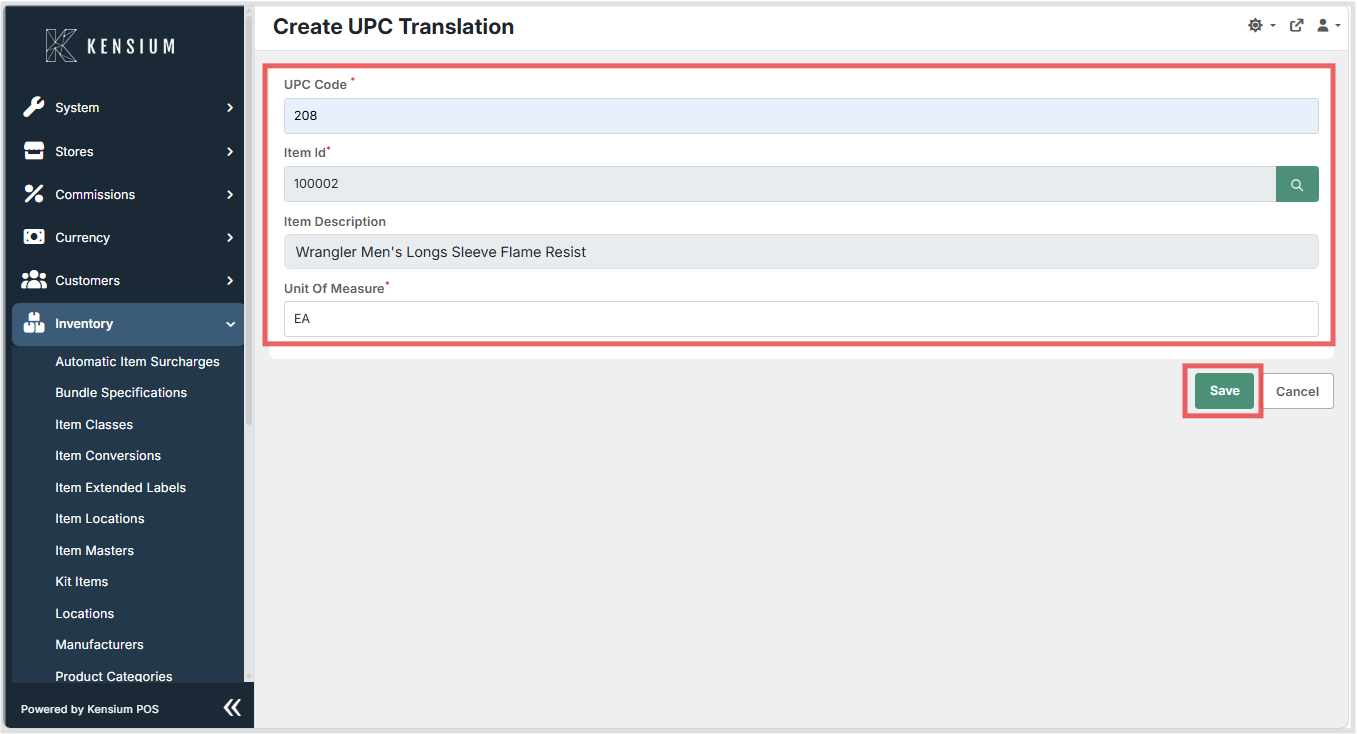
- Enter the UPC Code the barcode value that will be scanned or entered at the register. This field is required.
- Select or enter the Item Id the inventory item this UPC code maps to. Use the search icon to look up an item. This field is required.
- The Item Description is automatically populated when an item is selected and provides a human-readable label for the item.
- Enter the Unit Of Measure the unit of measure associated with this UPC code (e.g.,
EA,BOX10,PALLET). Defaults toEAif not specified. This field is required. - Click Save to persist the configuration, or Cancel to discard changes.
Available Fields
| Field | Description | Field Behavior |
|---|---|---|
| UPC Code | The barcode value that will be scanned or entered at the register. | Required. Together with Item Id and Unit Of Measure, uniquely identifies this translation record. |
| Item Id | The inventory item this UPC code maps to. | Required. Use the search icon to look up and select an item. |
| Item Description | A descriptive label for the item associated with this UPC code. | Optional. Automatically populated when an item is selected. If left empty, no description is stored. |
| Unit Of Measure | The unit of measure associated with this UPC code (e.g., EA, BOX10, PALLET). |
Required. Defaults to EA. Together with UPC Code and Item Id, uniquely identifies this translation record. |
Operational Considerations
- The combination of UPC Code, Item Id, and Unit Of Measure must be unique - the same UPC code can map to different items or units of measure, but the exact combination of all three cannot be duplicated.
- The same item can have multiple UPC translations with different units of measure (e.g.,
EA,BOX10,PALLET), enabling flexible scanning for different packaging configurations. - The Unit Of Measure field defaults to
EA(each) if not explicitly provided. - The Item Description field is optional; if left blank, it will appear empty in the grid.
- Records that are removed are marked as deleted and will no longer be used for barcode lookups, but are retained for historical reference.
- Deleting a UPC translation that is actively used at registers may cause barcode scan failures - verify that the UPC code is no longer in use before removing it.
Notes
- The UPC translations grid supports searching, column editing, and export/download actions.
- The grid displays Code, Item Id, Item Description, and Unit Of Measure columns with sortable headers.
- The create/edit form uses a text input for UPC Code, an item lookup with a search button for Item Id, an auto-populated field for Item Description, and a text input defaulting to
EAfor Unit Of Measure. - UPC Code, Item Id, and Unit Of Measure are all required fields (indicated by a red asterisk in the form).
- Multiple rows with the same UPC Code are permitted as long as they differ by Item Id or Unit Of Measure.