Item Conversions
| Summary Information | |
|---|---|
| Menu Path: | Inventory — Item Conversions |
| Required Feature(s): | Inventory |
Navigation:
Inventory → Item Conversions
The Item Conversions module allows administrators to define and manage conversion rules between different inventory items. This feature is essential for scenarios where an item can be converted into another item, specifying the exact quantity relationship between the source and destination items.
By configuring item conversions, organizations can accurately track inventory transformations, such as breaking down bulk items into individual units or assembling components into a finished product, ensuring inventory levels remain accurate across different units of measure or packaging types.
Purpose of Item Conversions
Item conversions are used to:
- Define the relationship and conversion ratio between two distinct inventory items.
- Facilitate accurate tracking of inventory when items are repackaged, broken down, or assembled.
- Ensure consistency in inventory quantities across different item representations.
- Streamline inventory management by automating the calculation of converted quantities.
Creating or Editing an Item Conversion
To configure a new item conversion rule or modify an existing one:
- Navigate to
Inventory → Item Conversions. - Click the + button to create a new item conversion, or use the grid Actions to edit an existing entry.
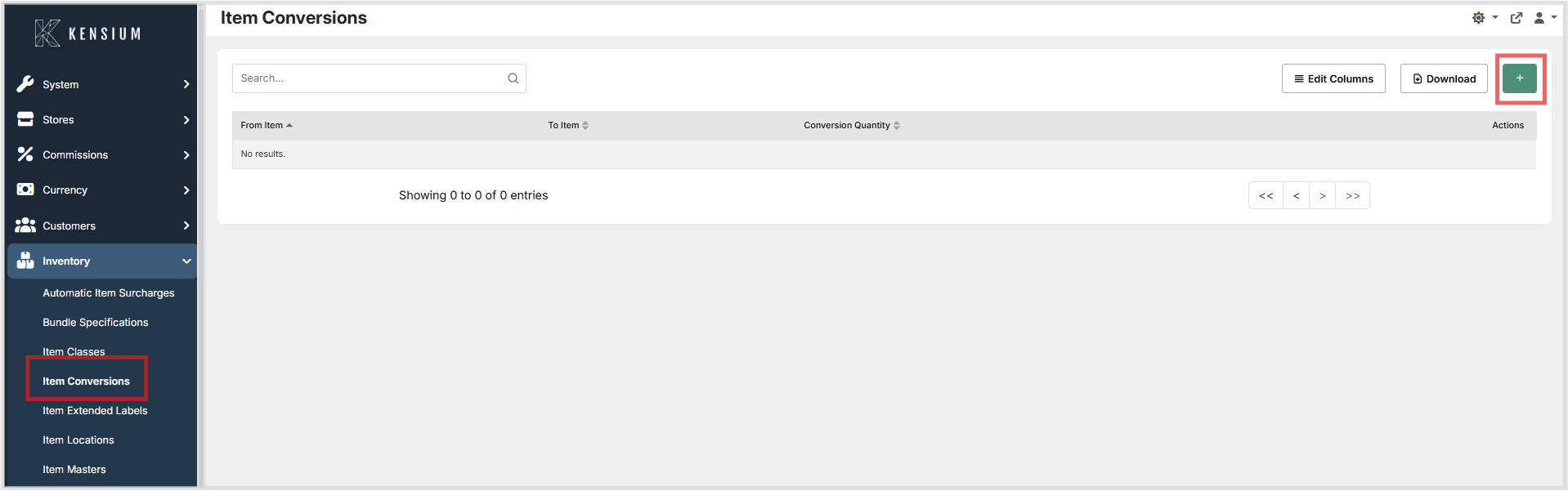
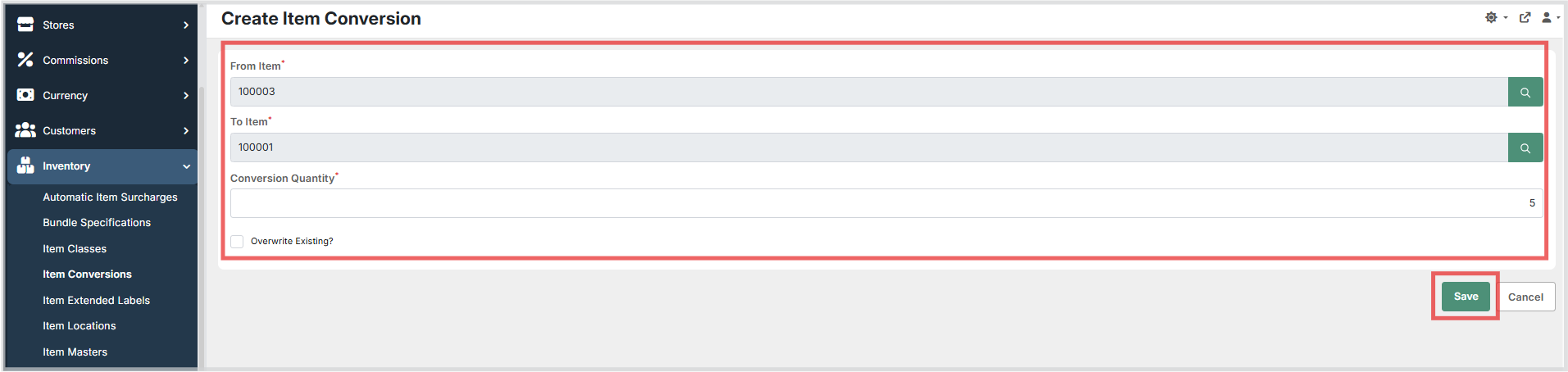
- Select the From Item using the item search picker. This is the source item that will be converted.
- Select the To Item using the item search picker. This is the destination item resulting from the conversion.
- Enter the Conversion Quantity, which specifies how many units of the To Item are created from one unit of the From Item.
- Optionally check the Overwrite Existing? box if you intend to replace an already configured conversion rule between these two items.
- Click Save to apply the configuration, or Cancel to discard the changes.
Available Fields
| Field | Description | Field Behavior |
|---|---|---|
| From Item | The source inventory item that is being converted. | Required. Use the item picker to search and select the item. |
| To Item | The destination inventory item that results from the conversion. | Required. Use the item picker to search and select the item. |
| Conversion Quantity | The number of units of the To Item produced from a single unit of the From Item. | Required. Must be a valid numeric value. |
| Overwrite Existing? | Indicates whether to replace an existing conversion rule for the selected item pair. | Checkbox. Check this box to update an existing conversion configuration between the same two items. |
Operational Considerations
- Ensure that the Conversion Quantity accurately reflects the physical or logical transformation between the items to maintain inventory accuracy.
- Item conversions affect inventory levels for both the From Item (decreased) and the To Item (increased) when a conversion transaction is performed.
- Review existing conversion rules before creating new ones to avoid conflicting configurations. Use the Overwrite Existing? option when updating an existing rule.
- Changes to item conversions apply to future inventory transactions only and will not retroactively adjust past conversions.
Notes
- The item conversions grid supports searching, column editing, and export / download actions.
- The create/edit form uses item search pickers for From Item and To Item, a numeric input for Conversion Quantity, and a checkbox for Overwrite Existing?.