Enterprise Settings
| Summary Information | |
|---|---|
| Menu Path: | System — Enterprise |
| Required Feature(s): | System |
Navigation:
System → Enterprise
The Enterprise Settings module provides administrators with the tools to configure global, enterprise-wide settings used throughout the POS deployment. This includes defining the tax calculation methodology, the default operational mode for cash drawers, and the integrated accounting system.
Purpose of Enterprise Settings
Enterprise settings are used to:
- Establish the taxation method that the POS is configured to use.
- Define the default operational mode for cash drawers and drawer sessions across the deployment.
- Specify the accounting system (or ERP) integrations supported by the POS.
- Maintain a single, centralized configuration for high-level operational parameters.
Configuring Enterprise Settings
To configure enterprise settings:
- Navigate to
System → Enterprise. - Select the appropriate configuration options from the available dropdown menus.
- Click Save to apply the changes, or Cancel to discard them.
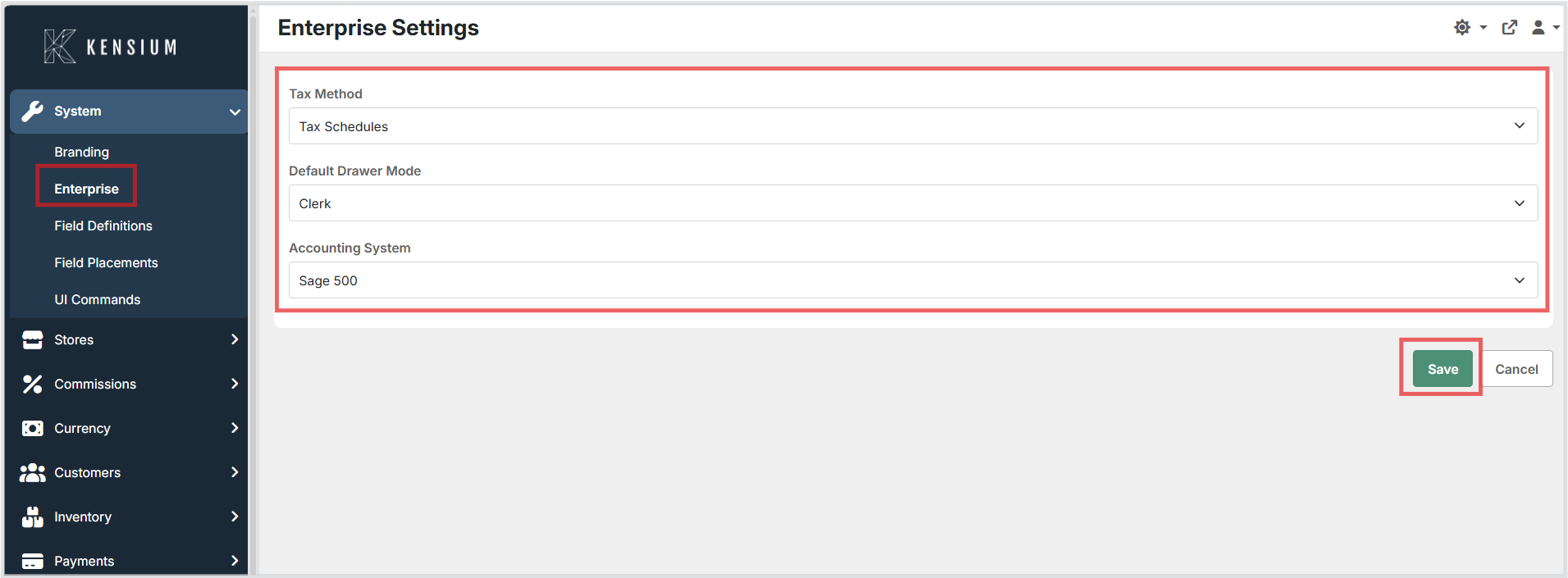
Available Fields
| Field | Description | Field Behavior |
|---|---|---|
| Tax Method | The taxation method that POS is configured to use. | Required selection. Determines how taxes are calculated across the enterprise (for example, Tax Schedules). |
| Default Drawer Mode | The default operational mode for cash drawers and drawer sessions. | Required selection. Sets the default mode (for example, Register) that POS is configured to use. This value can optionally be overridden at the Register Class level. |
| Accounting System | The accounting system (or ERP) integrations supported by POS. | Required selection. Specifies the integrated accounting system (for example, Sage 100) used by the enterprise. |
Operational Considerations
- The Enterprise settings follow a singleton pattern, meaning there is only a single configuration per POS deployment.
- The Default Drawer Mode acts as the global default but can be overridden for specific register classes if needed.
- Ensure the selected Accounting System matches the actual ERP integration configured for your environment.