Acumatica ASI
TODO Acumatica customization package?
This section outlines the procedure for deploying the ASI application by extracting required files and configuring the supported Acumatica version.
- Navigate to the designated FileShare location provided.
- Locate the compressed package (ZIP file) containing the ASI deployment files.
- Download the ZIP archive to the server.
- Extract the contents of the ZIP file on the FusionIS folder.
- Rename the extracted folder to: Fusion ASI for Acumatica.
- Locate the file named: FusionASI.exe.config
- Open the file using Notepad or Notepad++ with administrative privileges.
- Search for the following XML key:
- Replace the existing value with the Acumatica version used by the client. For example:
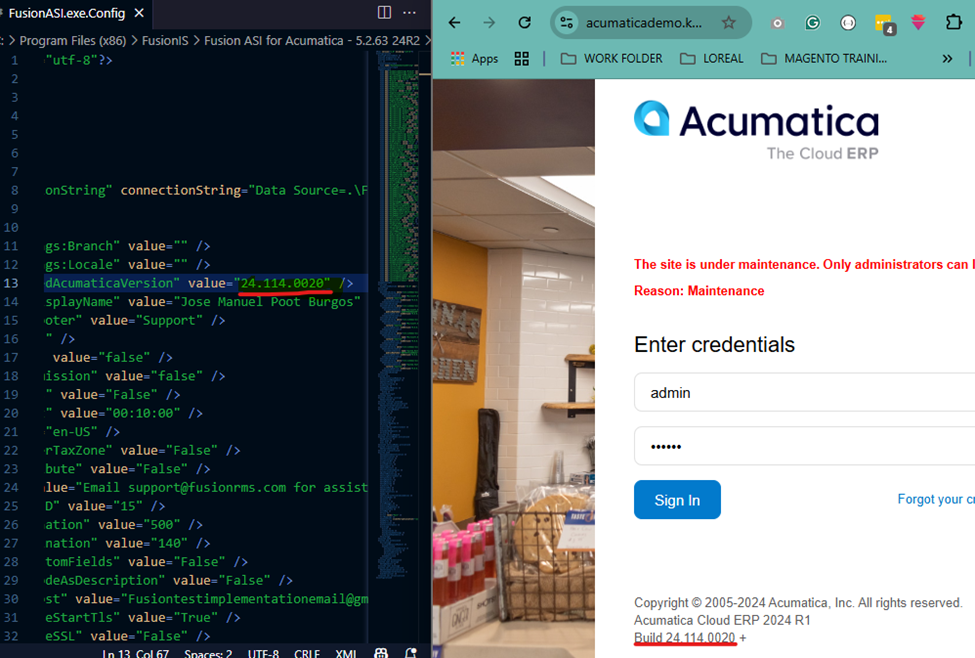
- Save and close the configuration file.