L0005 - Public SSL & Split-Horizon DNS
Securing internal services with SSL/TLS is essential for protecting data in transit, even within private networks. While self-signed certificates are commonly used, they often lead to trust issues and management overhead.
If a client is using Active Directory, Active Directory Certificate Services is the recommended way to manage SSL certificates within the client's network. See L0003 - AD Certificate Services for more information. Active Directory is recommended for all but the most trivial Windows networks.
For smaller clients that do not use Active Directory - for example, a client with a single store - an alternative approach is possible. This article explains how to use a public SSL certificate for an internal application (pos.example.com) using split-horizon DNS and the DNS-01 challenge for domain validation.
Overview
Why Use Public SSL Certificates Internally?
Using public SSL certificates for internal services offers several benefits:
- Trusted encryption without browser warnings
- Simplified certificate management across devices
- Compliance with security policies and standards
What Is Split-Horizon DNS?
Split-horizon DNS (also known as split-view DNS) allows different DNS responses based on the source of the query:
- Internal DNS resolves
pos.example.comto a private IP (e.g.,192.168.1.10) - External DNS resolves
pos.example.comonly for validation purposes (e.g., via a public DNS provider)
This setup ensures that internal users access the application privately, while external DNS is used solely for certificate validation.
Using DNS-01 Challenge for Certificate Validation
The DNS-01 challenge is ideal for internal applications because it doesn't require public HTTP access. Instead, it proves domain ownership by creating a specific DNS TXT record.
How It Works:
-
Request a certificate from a Certificate Authority (CA) like Let's Encrypt, GoDaddy, or Amazon.
-
The CA provides a challenge token.
-
You create a TXT record in your domain's DNS:
1 | |
-
The CA queries the public DNS for this record.
-
If the record matches, the certificate is issued.
Diagram
The following diagram illustrates how a public SSL certificate can be used to secure an internal web server:
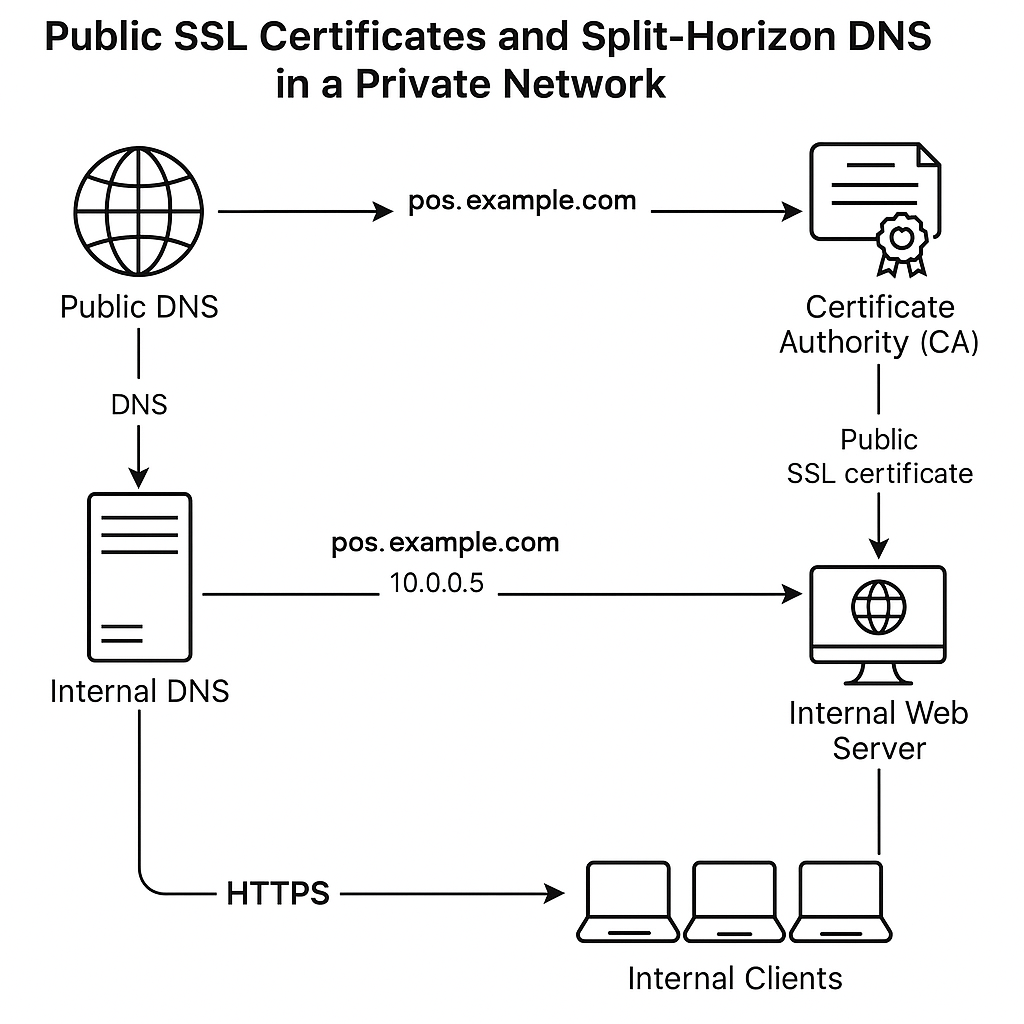 In this diagram:
- The public certificate authority (CA) grants the SSL certificate.
- Public DNS provides TXT records to enable DHS-01 challenge validation by the CA.
- Internal DNS resolves the IP address of the application/store within the client's private network; these IP addresses are not visible to the public internet.
Implementation Steps
1. Choose a Public Domain Name
Use the client's domain name that they already own (e.g., example.com) and create a subdomain for the store (e.g., pos.example.com).
2. Obtain a Public SSL Certificate
Use a public CA like Godaddy, Let's Encrypt, DigiCert, or Sectigo to issue a certificate for your internal service domain.
- Ensure the domain is publicly resolvable and the CA can validate ownership (via DNS-01 challenge).
- DNS-01 is preferred for internal services since it doesn’t require public HTTP access (no web server must be exposed on the internet).
3. Configure Split-Horizon DNS
Configure your DNS servers:
- Internal DNS: Set
pos.example.comto point to your internal server (e.g.,10.0.0.5). - External DNS: Ensure your public DNS provider allows TXT records and does not resolve
pos.example.comto any public IP.
4. Deploy the Certificate Internally
Install the public SSL certificate on your internal service (e.g., RMS web server).
- Ensure the private key is securely stored.
- Configure the service to use the certificate for HTTPS/TLS.
5. Test Internal Access
From an internal client:
- Access
https://pos.example.com - Verify the certificate is trusted and the connection is encrypted.
6. Automate Renewal
If using Let's Encrypt or another CA with short-lived certificates:
- Use tools like Certbot or acme.sh to automate renewal.
- Ensure DNS challenges can be completed automatically.
Security Considerations
- Ensure your internal DNS is isolated and secure
- Limit access to the DNS management interface
- Monitor certificate expiration and renewal logs
Summary
Using a public SSL certificate with split-horizon DNS and the DNS-01 challenge allows you to secure internal applications like pos.example.com without exposing them to the internet. This approach combines strong encryption, trusted certificates, and flexible DNS management for a robust internal security posture.